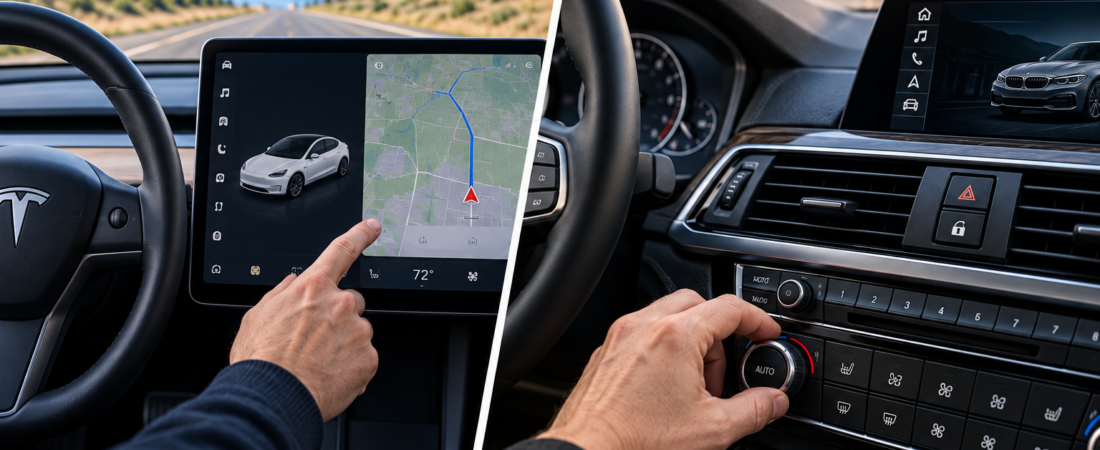
Modern cars have never looked more futuristic.
Massive touchscreens dominate dashboards. Traditional buttons are disappearing. Climate controls, seat heaters, navigation, and even basic vehicle settings are increasingly managed through digital menus.
Automakers describe these changes as cleaner, smarter, and more flexible.
But there’s an uncomfortable question behind the technology.
Are modern cars becoming more difficult to operate while driving?
A touchscreen can control hundreds of functions through a single display. Physical buttons require more space, but they often allow drivers to perform familiar actions without looking away from the road.
That difference may seem small when the vehicle is parked.
At highway speeds, however, even a few seconds of visual distraction can matter.
In this touchscreens vs physical buttons comparison, we’ll examine driving safety, reaction time, usability, interior design, software flexibility, and the real-world consequences of replacing traditional controls with screens.
We’ll also calculate how far a vehicle travels while its driver looks away from the road.
The goal isn’t to argue that touchscreens are inherently dangerous or that physical buttons are always superior.
It’s to identify which controls belong on a screen and which should remain accessible by touch.
Quick Verdict: Touchscreens are excellent for navigation, complex settings, and flexible interfaces. Physical controls generally offer advantages for frequent, time-sensitive tasks that drivers need to operate without looking away from the road. The best vehicle interiors combine both approaches.
Comparison Outline
- Touchscreens vs physical buttons: Quick comparison
- Why automakers are replacing buttons
- The real safety issue: Eyes off the road
- The Compareason Calculation: Distance traveled while distracted
- Climate controls and everyday usability
- Tesla vs traditional dashboard design
- What scientific research actually tells us
- Physical feedback and muscle memory
- Software updates and long-term ownership
- Manufacturing costs and design
- What the ideal dashboard should look like
- Frequently asked questions
- The Compareason Verdict
1. Touchscreens vs Physical Buttons: Quick Comparison
Touchscreens and physical controls solve different problems.
A touchscreen provides flexibility and allows manufacturers to display many functions within a relatively small area.
Physical buttons provide tactile feedback and can make certain tasks easier to perform without visual confirmation.
| Feature | Touchscreens | Physical Buttons |
|---|---|---|
| Interior appearance | Minimalist and digital | Traditional or hybrid |
| Number of functions | Very high | Limited by physical space |
| Tactile feedback | Usually limited | Strong |
| Eyes-free operation | Often difficult | Often easier with familiar controls |
| Software flexibility | High | Limited |
| Climate adjustment | May require menus | Often direct |
| Customization | Software-dependent | Hardware-dependent |
| Repair complexity | Centralized display/electronics | Individual controls and electronics |
| Best applications | Navigation, media, complex settings | Climate, defrost, volume, frequent controls |
Neither interface is automatically safer in every situation.
A poorly positioned physical button can also distract drivers.
Likewise, a well-designed touchscreen with large controls and minimal menu depth can be easier to use than a complicated collection of buttons.
The important factor is the amount of attention required to complete a task.
The Compareason Insight: The best dashboard isn’t the one with the fewest buttons. It’s the one that requires the least attention to operate safely.
2. Why Are Automakers Replacing Physical Buttons?
The move toward touchscreen-heavy interiors didn’t happen by accident.
It reflects several overlapping trends.
A Cleaner, More Modern Appearance
Large displays create a futuristic impression.
A dashboard with fewer visible controls can look more spacious and technologically advanced.
For manufacturers, that visual identity can become a major selling point.
Software Flexibility
Traditional buttons are designed for specific functions.
A touchscreen can display different controls depending on the situation.
Manufacturers can change menus, introduce features, and improve interfaces through software updates.
That flexibility is especially attractive as vehicles become more software-driven.
Hardware Consolidation
A central touchscreen can replace multiple dedicated control panels.
This may reduce the number of physical switches and simplify some aspects of interior design and component sourcing.
However, large automotive displays, processors, and software development also have significant costs.
Removing buttons does not automatically make a vehicle cheaper to manufacture.
A Different Philosophy of Car Design
Traditional dashboards were designed around mechanical interaction.
Modern digital dashboards increasingly resemble smartphones and tablets.
But a car isn’t a smartphone.
A person using a smartphone can usually stop walking or sit down to focus on the screen.
A driver must continue monitoring the road while interacting with the vehicle.
Our Take: Touchscreens provide real design and software advantages, but automotive interfaces must prioritize driving attention over visual minimalism.
3. The Real Safety Issue: Eyes Off the Road
The central safety concern with touchscreen-heavy vehicles is visual distraction.
Drivers must divide their attention between operating the vehicle and interacting with the interface.
Physical buttons can sometimes reduce the need for visual attention because their locations and shapes can be learned.
Touchscreens often require drivers to locate virtual controls visually.
Why Tactile Feedback Matters
Imagine adjusting the temperature while driving.
With a familiar physical knob, you may be able to reach toward the control and turn it without looking directly at it.
With a touchscreen, you may need to:
- Locate the climate control area.
- Identify the correct virtual button.
- Touch the screen accurately.
- Confirm the setting changed.
Some modern vehicles reduce these steps by keeping climate controls permanently visible.
Others place frequently used functions inside menus.
The number of steps matters, but the total visual and cognitive demand matters more.
What About Voice Commands?
Voice control can reduce the need to touch a screen.
However, it isn’t a perfect replacement for physical controls.
Voice recognition may struggle with background noise, accents, ambiguous requests, or unavailable commands.
Voice interaction can also create cognitive distraction, even when the driver’s eyes remain on the road.
What Do Safety Guidelines Say?
The U.S. National Highway Traffic Safety Administration (NHTSA) has published voluntary driver-distraction guidelines for in-vehicle electronic devices.
These guidelines emphasize limiting the visual and manual demands of secondary tasks while driving.
They are not a universal rule that all touchscreen interactions are unsafe.
Our Take: The safest control is generally one that can be operated accurately with minimal visual, manual, and cognitive distraction.
4. The Compareason Calculation: How Far Do You Travel While Looking at a Screen?
Let’s turn a small distraction into something measurable.
At 60 mph, a vehicle travels approximately 88 feet every second.
That means even a brief glance away from the road covers a significant distance.
Distance Traveled at 60 mph
| Eyes-Off-Road Time | Distance Traveled |
|---|---|
| 1 second | 88 feet |
| 2 seconds | 176 feet |
| 3 seconds | 264 feet |
| 4 seconds | 352 feet |
| 5 seconds | 440 feet |
Five seconds at 60 mph means traveling approximately 440 feet.
That’s longer than an American football field, including both end zones.
The vehicle continues moving while the driver’s visual attention is directed elsewhere.
A Hypothetical Climate-Control Example
Suppose a driver adjusts the cabin temperature using two different interfaces.
Physical knob:
Total eyes-off-road time: 0.5 seconds.
Touchscreen interface:
Total eyes-off-road time: 2.5 seconds.
At 60 mph:
Physical knob: 44 feet.
Touchscreen: 220 feet.
Difference: 176 feet.
In this hypothetical scenario, the touchscreen interaction involves an additional 176 feet of travel while the driver’s eyes are away from the road.
These times are illustrative assumptions, not measured results from a particular Tesla, BMW, or other vehicle.
Actual distraction depends on the interface, task, driver familiarity, and driving conditions.
Why This Calculation Matters
The difference isn’t necessarily how long the driver takes to complete the task.
It’s how much of that time requires visual attention.
A task can take several seconds while still allowing the driver to monitor the road intermittently.
Conversely, a shorter task may demand intense visual concentration.
The Compareason Insight: Dashboard usability should be measured by attention required, not simply by the number of controls or taps.
5. Climate Controls: The Best Example of the Problem
Climate control is one of the clearest examples of the trade-off between physical and digital interfaces.
Drivers frequently adjust temperature, fan speed, airflow, and defrost settings.
These are routine tasks, but some also affect visibility and comfort.
Physical Climate Controls
Traditional climate systems often use knobs and buttons.
Their advantages include:
- Predictable locations
- Tactile feedback
- Direct access to frequently used functions
- Easier operation with gloves in some designs
- Less dependence on menu navigation
However, complicated climate panels with many similar-looking buttons can also be confusing.
Touchscreen Climate Controls
Digital climate interfaces can provide precise settings, visual feedback, and additional customization.
They can also support automated climate programs and software updates.
The disadvantage appears when basic functions require several menu interactions.
A Better Approach
An effective hybrid climate system could combine:
- Physical temperature controls
- Dedicated front and rear defrost buttons
- Easily accessible fan controls
- Touchscreen access to advanced climate settings
- Optional voice commands
This approach preserves direct access to frequent tasks while retaining digital flexibility.
Our Take: Climate controls are among the strongest candidates for physical buttons or knobs, particularly when the functions are frequently adjusted while driving.
6. Tesla vs Traditional Dashboard Design
Tesla helped popularize the idea of replacing traditional automotive controls with a large central display.
Its minimalist interiors demonstrate how far touchscreen integration can go.
However, Tesla isn’t the only manufacturer using digital interfaces, and its control layouts vary by model and software version.
Tesla’s Approach
Tesla vehicles rely heavily on central touchscreen interfaces for navigation, climate settings, media, and vehicle configuration.
Some models also use steering-wheel controls and voice commands for selected functions.
Advantages include:
- Clean interior design
- Centralized vehicle information
- Frequent software improvements
- Flexible interface customization
- Integration with vehicle systems
Potential disadvantages include:
- Dependence on the central display
- Limited tactile feedback for some functions
- Menu navigation for certain tasks
- Learning curve for unfamiliar drivers
BMW and Other Hybrid Approaches
BMW and several other manufacturers combine digital displays with selected physical controls.
Depending on the model, these may include steering-wheel buttons, rotary controllers, volume controls, and dedicated vehicle functions.
However, BMW’s newer interiors have also moved toward greater touchscreen integration.
The comparison is therefore not simply Tesla equals touchscreen and BMW equals physical buttons.
Both manufacturers have changed their interface strategies over time.
Which Approach Is Better?
Tesla’s approach may appeal to drivers who value minimalist design and software flexibility.
Hybrid dashboards may appeal to drivers who prefer tactile controls for frequent tasks.
The better choice depends on the specific vehicle and the functions that remain physically accessible.
Our Take: A modern dashboard should be evaluated by how easily drivers can perform common tasks, not by the brand’s design philosophy alone.
7. What Scientific Research Actually Tells Us
Research into driver distraction suggests that interface design can affect the time and attention required to complete secondary tasks.
However, results vary depending on the task, test method, and vehicle.
Research on Touchscreen Interaction
A study published in the journal Transportation Research Part F: Traffic Psychology and Behaviour examined driver distraction associated with in-vehicle touchscreens.
Research in this area has identified concerns about visual-manual interaction and the demands placed on drivers during secondary tasks.
However, individual findings should not be generalized to every vehicle or touchscreen design.
The Swedish Magazine Vi Bilägare Test
In 2022, Swedish automotive publication Vi Bilägare conducted a comparison involving several modern vehicles and an older vehicle with more traditional controls.
Drivers performed common tasks while driving, including adjusting climate and infotainment functions.
The test reported that the older vehicle with physical controls allowed tasks to be completed over a shorter distance than several touchscreen-heavy vehicles.
The comparison attracted attention because it illustrated how modern interfaces can require more time for familiar functions.
However, it was a limited practical comparison, not a comprehensive scientific evaluation of every automotive interface.
What the Evidence Does Not Prove
The available evidence does not establish that:
- Every touchscreen is more distracting than every physical control.
- Physical buttons eliminate driver distraction.
- All touchscreen-heavy vehicles are equally difficult to operate.
- A single test can determine which entire vehicle is safest.
Interface placement, task complexity, familiarity, and driving conditions all matter.
The Important Distinction
A touchscreen can be appropriate for functions used primarily while parked.
A physical control may be preferable for a frequently used function that requires immediate interaction while driving.
Our Take: The evidence supports reducing visual-manual distraction, rather than eliminating touchscreens altogether.
8. Physical Feedback and Muscle Memory: Why Buttons Still Matter
One of the biggest advantages of physical controls is something drivers rarely think about: muscle memory.
After using the same vehicle for several weeks or months, drivers often learn where frequently used controls are located.
A familiar volume knob, temperature dial, or defrost button can become almost automatic to operate.
The Advantage of Tactile Feedback
Physical controls provide information through touch.
A driver can often recognize a button by its position, shape, or texture.
A rotary knob may also provide resistance or a clicking sensation that confirms an adjustment.
Touchscreens generally provide less tactile information.
Even when a touchscreen uses haptic feedback, the driver may still need to locate the virtual control visually before interacting with it.
Why Muscle Memory Matters
Consider a driver who adjusts the temperature several times during a journey.
With a familiar physical knob, the movement can become predictable.
With a touchscreen, the driver may need to visually locate the correct control, especially if the interface changes depending on the active menu.
This doesn’t mean every touchscreen interaction is difficult.
Persistent controls, large touch targets, and intuitive layouts can substantially improve usability.
Can Touchscreens Develop Muscle Memory?
Yes, to a degree.
Drivers can become familiar with screen layouts and remember where controls are positioned.
However, virtual controls may move when software updates change the interface or when different menus are displayed.
Physical controls usually maintain the same location throughout the vehicle’s life.
Our Take: Physical buttons have a meaningful advantage for frequent actions because tactile feedback and consistent positioning can reduce reliance on visual attention.
9. Software Updates: The Touchscreen’s Biggest Long-Term Advantage
While physical buttons offer tactile advantages, touchscreens provide something traditional controls cannot easily match: flexibility.
A touchscreen interface can change through software.
Manufacturers can introduce new features, reorganize menus, improve graphics, and modify vehicle settings without replacing dashboard hardware.
The Benefits of Software-Defined Controls
Software updates may provide:
- Improved menu organization
- New vehicle features
- Better navigation integration
- Additional customization
- Accessibility improvements
- Bug fixes
A well-designed update can make an existing vehicle easier to use.
For example, a manufacturer could move a frequently used climate control from a secondary menu to a permanently visible section of the display.
That could reduce the number of interactions required.
But Software Updates Can Also Create Problems
A familiar interface may change unexpectedly.
Controls can move to different locations, requiring drivers to relearn certain tasks.
Software bugs may also temporarily affect interface responsiveness.
In vehicles where many functions depend on one display, a screen malfunction can have a greater impact on convenience.
Safety-critical systems generally have additional engineering requirements, but their specific implementation varies by vehicle.
Long-Term Ownership Considerations
A vehicle may remain on the road for 10 years or longer.
During that period, software support, replacement parts, and display reliability become important considerations.
A physical button can also fail, but repairing an individual switch may differ significantly from repairing an integrated display assembly.
Neither design guarantees lower repair costs.
Our Take: Touchscreens win for software flexibility, but manufacturers should avoid sacrificing long-term usability for short-term design simplicity.
10. Manufacturing Costs: Are Automakers Removing Buttons to Save Money?
It’s tempting to assume that automakers replace physical buttons with touchscreens simply because screens are cheaper.
The reality is more complicated.
Potential Cost Advantages
A centralized display may reduce the need for multiple individual switches, wiring connections, and dedicated control panels.
Using similar screen-based interfaces across different vehicle models may also simplify certain aspects of production.
For manufacturers producing vehicles at scale, component standardization can be valuable.
The Hidden Costs of Digital Interfaces
However, large automotive displays are not free.
They require:
- Display panels
- Processors and electronic components
- Software development
- Testing and validation
- Thermal management
- Integration with vehicle systems
- Long-term support
A sophisticated digital dashboard can be expensive to develop and maintain.
Does Removing Buttons Actually Save Money?
It may reduce certain hardware and assembly costs, but the net savings depend on the complete vehicle architecture.
Without access to manufacturer cost data, it would be misleading to claim that a specific automaker saves a particular amount per vehicle by removing buttons.
What About Consumers?
Even if touchscreen integration reduces manufacturing costs, those savings do not necessarily translate into lower vehicle prices.
Manufacturers also consider branding, perceived technology, interior design, and product positioning.
The Compareason Insight: A minimalist dashboard may reduce visible complexity without necessarily reducing the complexity or cost of the vehicle itself.
11. What Should the Ideal Car Dashboard Look Like?
The future of automotive interiors doesn’t have to be a choice between traditional buttons and giant touchscreens.
The best solution may be a carefully designed combination of both.
Modern vehicles need sophisticated digital interfaces for navigation, entertainment, driver assistance, and vehicle customization.
But they also need simple, predictable controls for tasks drivers perform frequently.
Keep Physical Controls for Essential Functions
An ideal dashboard should provide easy access to frequently used functions without requiring complicated menu navigation.
These may include:
- Hazard warning lights
- Front and rear windshield defrosting
- Temperature adjustment
- Audio volume
- Frequently used climate functions
- Essential driving controls
Physical controls can provide tactile feedback, allowing drivers to locate and operate them with less visual attention once familiar with the layout.
However, physical placement and control design remain important.
A small button hidden behind the steering wheel may be less convenient than a well-positioned touchscreen control.
Use Touchscreens for Complex Functions
Touchscreens are particularly useful for functions that require visual information or multiple settings.
Examples include:
- Navigation maps
- Media browsing
- Vehicle personalization
- Charging schedules
- Detailed energy consumption information
- Advanced driver-assistance settings
These functions benefit from flexible displays and software updates.
Many should be configured while parked rather than during active driving.
The Ideal Hybrid Dashboard
| Vehicle Function | Preferred Interface | Reason |
|---|---|---|
| Hazard lights | Physical button | Immediate access |
| Windshield defrost | Physical button | Visibility and convenience |
| Temperature adjustment | Physical control or persistent simple interface | Frequent use |
| Audio volume | Physical knob or steering-wheel control | Tactile operation |
| Navigation map | Touchscreen | Visual information |
| Media browsing | Touchscreen and voice control | Flexible selection |
| Vehicle settings | Touchscreen | Complex configuration |
| Charging schedule | Touchscreen or mobile app | Usually adjusted while parked |
| Driver assistance controls | Dedicated, clearly identified controls | Predictable operation |
This isn’t a universal engineering standard.
It’s a practical design framework based on minimizing unnecessary interaction during driving.
The Role of Voice Control
Voice assistants can complement both physical controls and touchscreens.
For example, a driver may be able to adjust the cabin temperature or change music without reaching toward the dashboard.
However, voice control should not become the only way to access important functions.
Speech recognition errors, background noise, and system limitations can reduce reliability.
The Future May Be Less About Screens and More About Attention
As vehicles become increasingly software-driven, manufacturers have an opportunity to improve interface design.
The goal should not simply be to remove physical components.
It should be to reduce the effort required to operate the vehicle safely.
The Compareason Insight: The most advanced dashboard may not be the one with the largest screen. It may be the one that lets drivers spend the least time thinking about the dashboard.
12. Frequently Asked Questions
Are touchscreens more dangerous than physical buttons in cars?
Touchscreens can require more visual attention for certain tasks, particularly when controls are small or buried in menus. Physical buttons can provide tactile feedback that reduces the need to look away from the road. However, safety depends on the specific interface, task, and driving conditions.
Why are automakers removing physical buttons?
Automakers use touchscreens to create minimalist interiors, consolidate functions, and support software-based features. Digital interfaces can also be updated without replacing physical controls. However, these benefits must be balanced against usability and driver distraction.
Are Tesla touchscreens difficult to use while driving?
Tesla’s touchscreen-centered design offers extensive functionality and software flexibility. Some tasks may require visual interaction, while others can be performed using steering-wheel controls or voice commands. Ease of use depends on the model, software version, and driver familiarity.
Are physical buttons always safer?
No. Poorly positioned buttons or complicated control layouts can also distract drivers. Physical controls are most useful when they are easy to locate, distinguish, and operate without extensive visual attention.
How far does a car travel in two seconds at 60 mph?
At 60 mph, a vehicle travels approximately 88 feet per second.
In two seconds, it travels about 176 feet.
This illustrates why even brief periods of visual distraction can be significant.
Do voice commands make touchscreens safer?
Voice commands can reduce the need for manual interaction, but they do not eliminate cognitive distraction. Drivers must still pay attention to the road, and voice systems can occasionally misunderstand commands.
Which car manufacturers still use physical buttons?
Many manufacturers retain physical controls for selected functions, including steering-wheel commands, hazard lights, climate settings, and audio adjustments. However, the amount of physical control varies significantly by model and model year.
Are touchscreens cheaper for automakers to manufacture?
Consolidating controls into a central display may reduce some physical components and wiring complexity. However, large automotive displays, processors, software development, and system integration can also be expensive. Touchscreens do not automatically reduce total manufacturing costs.
Can car touchscreens be improved through software updates?
Yes. Manufacturers can improve menu layouts, introduce shortcuts, and change certain interface functions through software updates. However, software cannot fully replicate the tactile feedback of a physical button or knob.
What is the safest way to adjust climate controls while driving?
Use controls that require minimal visual attention, preferably when traffic conditions permit. Familiar physical controls, steering-wheel shortcuts, or well-designed voice commands may reduce interaction demands. If a task requires extended attention, wait until the vehicle is safely stopped.
Will physical buttons disappear from cars completely?
That is uncertain. Some manufacturers have moved toward touchscreen-heavy interiors, while others continue to emphasize physical controls for important functions. Future designs may increasingly combine both approaches.
Should I avoid buying a car with a large touchscreen?
Not necessarily. A large touchscreen can provide excellent navigation, information, and customization. The more important question is whether frequently used controls remain easy to operate without distracting the driver.
13. The Compareason Verdict: Touchscreens vs Physical Buttons
Overall Winner for Frequently Used Driving Controls: Physical Buttons
For functions that drivers operate regularly while the vehicle is moving, well-designed physical buttons and knobs generally offer important usability advantages.
Their tactile feedback and predictable locations can help drivers complete familiar tasks with less visual attention.
This is especially valuable for climate controls, audio volume, and windshield defrosting.
However, that doesn’t mean every physical control is automatically superior.
Placement, size, feedback, and familiarity all influence usability.
Best Choice for Navigation and Complex Features: Touchscreens
Touchscreens remain extremely valuable in modern vehicles.
They provide flexible interfaces for navigation, entertainment, vehicle settings, and advanced features.
Software updates can improve their functionality without requiring hardware changes.
For information-rich tasks, physical buttons alone cannot offer the same flexibility.
Best Overall Dashboard Design: A Hybrid System
The strongest approach combines physical controls for frequent tasks with digital interfaces for complex functions.
This provides a balance between usability, flexibility, and modern design.
The Compareason Calculation: Why Small Distractions Matter
At 60 mph, a vehicle travels approximately 88 feet every second.
A hypothetical touchscreen interaction requiring 2.5 seconds of eyes-off-road time means traveling approximately 220 feet without looking at the road.
A hypothetical physical-control interaction requiring 0.5 seconds of eyes-off-road time means approximately 44 feet.
The difference is 176 feet.
These numbers do not prove that a particular touchscreen is unsafe or that a specific physical control is always better.
They illustrate why interface designers should minimize visual distraction.
Our Final Recommendation
Choose a vehicle with easily accessible physical controls if you prioritize intuitive operation and frequently adjust climate, audio, or other basic functions while driving.
Choose a touchscreen-focused vehicle if you value digital customization and software flexibility, but evaluate how easily essential functions can be accessed.
The ideal choice is a vehicle that combines both technologies without forcing drivers to navigate complicated menus for routine tasks.
Before buying a new car, spend a few minutes testing the dashboard.
Try adjusting the temperature, changing audio volume, activating defrosting, and finding commonly used functions.
Do these tasks while the vehicle is parked, and consider how much attention they might require during driving.
A beautiful dashboard is appealing.
A technologically advanced dashboard is impressive.
But neither matters as much as an interface that supports safe, confident driving.
The Compareason Verdict: Touchscreens are better for flexibility. Physical buttons are better for tactile, frequently used controls. The smartest modern cars know when to use each.
Compare with Reason.